Help Us Identify Wolves
Review the images presented and click the corresponding button to identify the dominant animal shown. Your input helps train our detection models.
How it works
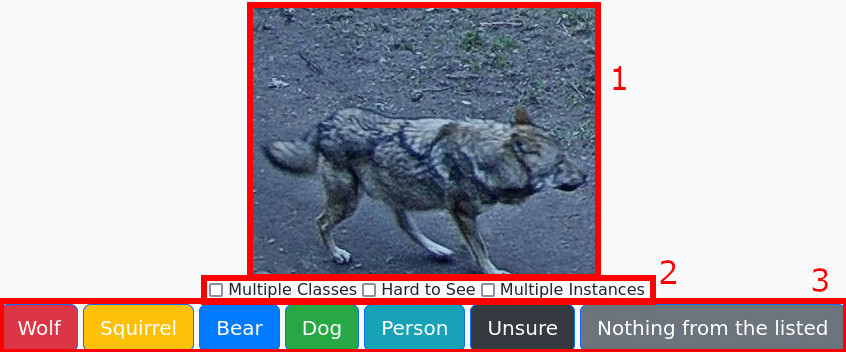
The interface consists of three main areas as numbered in the example above:
- The image to be analyzed.
- Image properties (Checkboxes):
- Multiple Classes: Are several different animal types visible (e.g., a dog and a human)? Check this box and select the most dominant class.
- Hard to see: Is the animal poorly lit or hidden behind a tree?
- Multiple instances: Are there several animals of the same type (e.g., a pack of wolves)?
- The class selection area: Click the button that represents the most dominant animal. The next image will load automatically.
Frequently Asked Questions
How big should the wolf be in the image?
Some images contain vast landscapes with only a tiny wolf in the corner. For our detection model, it's important that the wolf is a significant part of the picture (covering at least 10%). If in doubt, mark the picture as "Wolf".
I think I have already seen this picture!
The pictures shown to you are generated by our preprocessing toolchain. This creates several similar variations of an image. Seeing the exact same picture is rare, but seeing highly similar ones is expected.
How many pictures are currently in the system?
You can find this information in our statistics dashboard (part of the admin menu).
Where are the photos from?
Most photos are taken by us in zoos and wildlife parks in Germany. Some are also donated by camera trap owners.